Introduction to Vectors II
Looking ahead
Objectives
- Use R to define a vector.
- Use R to perform vector addition, subtraction, and scalar multiplication.
- Given a vector field and an input point, evaluate the field at that point and draw the 2-D output vector by hand, originating from the input point.
- Use R to plot a given vector field.
1. Defining a Vector in R
Objective. Use R to define a vector.
The command c(...) is the R function that returns a vector whose components are its inputs, in the order listed. The c stands for combine.
u = c(-1, 1) | |
u | the vector’s name |
= | the assignment that stores the vector under that name and prints nothing |
c(...) | the command |
-1 | the first component |
1 | the second component |
Grouping parentheses. Plain parentheses group one calculation, as in (2 + 3) * 4. R rejects (1, 2, 3), because a list of numbers inside plain parentheses is a syntax error. The vector comes from c(1, 2, 3). The command c() is the only way to build a vector in this course.
The name c. Naming a vector c is legal but confusing, because c() still works as the command. Prefer another short name: k, u, vec1.
Example 1
Use R to store the vectors
then print .
ShowHide solution
Store each vector under its name with c(), then type the name u to print it:
u = c(-1, 1)
v = c(4, 0)
w = c(-3, 3)
u
The last line prints [1] -1 1.
R’s printed output.
- Bracketed output. R prints
[1] 3 1for the vector . The bracketed number[1]gives the position of the first value on that line and is left out of the answer. - Row versus column. R prints a vector across the line. In Math 141 a vector is written down a column. Write the output
[1] 3 1as on paper and on Gradescope.
Example 2
A drone climbs from its launch point to a point 30 meters east, 40 meters north, and 120 meters up. Store its displacement
in R and print it.
ShowHide solution
List the three components in order inside c(), then type the name. Used R.
d = c(30, 40, 120)
d
[1]  30  40 120
R prints the components across the line in the order typed: east, north, and up. The first printed number after [1], 30, is the first component . Written as a column, the output is .
Next: 2. Vector Arithmetic in RLesson map
2. Vector Arithmetic in R
Objective. Use R to perform vector addition, subtraction, and scalar multiplication.
Vector addition, subtraction, and scalar multiplication are defined in Lesson 15 section 4. Type each one in R with the ordinary arithmetic symbol.
| Description | Handwritten | R Code |
|---|---|---|
| Vector addition | u + v | |
| Vector subtraction | u - v | |
| Scalar multiplication | 3 * v |
Example 3
For
compute , , and in R.
ShowHide solution
Store the three vectors, then type each combination with the arithmetic symbols. Used R.
u = c(-1, 1)
v = c(4, 0)
w = c(-3, 3)
u + v
[1] 3 1
2 * v + w
[1] 5 3
-w + 3 * u
[1] 0 0
Each of the last three R lines computes one combination, in the order asked. Written as columns, the three results are
Example 4
Two drones sit at the positions and , in meters east, north, and up from the launch point:
In R, compute the displacement from the first drone to the second, and half of that displacement, .
ShowHide solution
Store both positions, subtract with -, and scale with *. The parentheses make R subtract before it scales. Used R.
r1 = c(30, 40, 120)
r2 = c(10, 60, 100)
r2 - r1
[1] -20  20 -20
0.5 * (r2 - r1)
[1] -10  10 -10
Written as columns, the two results are
The second drone sits 20 meters west, 20 meters north, and 20 meters down from the first. Half of that displacement leads from the first drone to the point halfway between the two drones: 10 meters west, 10 meters north, and 10 meters down.
Matching dimensions. Addition and subtraction require matching dimensions, but R adds vectors of different dimensions anyway. It repeats the components of the vector with fewer components until the two counts match, and returns a vector of the larger dimension. R prints a warning only when the larger dimension is not a whole multiple of the smaller one, as in Example 5, and prints none in Example 6.
- Count the components of both vectors before typing anything. If the counts differ, the operation is undefined, whatever R prints.
- On Gradescope, click the Not Applicable box for each missing component, or for every component when the operation is undefined, and leave the answer boxes blank.
Example 5
For
find .
ShowHide solution
The sum is undefined, because has two components and has three. R still prints a result:
> u = c(-1, 1)
> p = c(1, 2, 3)
> u + p
[1] 0 3 2
Warning message:
In u + p : longer object length is not a multiple of shorter object length
On Gradescope, click the Not Applicable box for every component and leave the answer boxes blank.
Example 6
For
find .
ShowHide solution
The sum is undefined, because has two components and has four. This time R prints no warning, because four is a whole multiple of two:
u = c(-1, 1)
q = c(1, 2, 3, 4)
u + q
[1] 0 3 2 5
Next: 3. Vector Fields by HandLesson map
3. Vector Fields by Hand
Objective. Given a vector field and an input point, evaluate the field at that point and draw the 2-D output vector by hand, originating from the input point.
On a weather map, the wind at every point has a speed and a direction. Both are drawn as one arrow at that point.
Definition 1 (Vector field).
A vector field is a function whose input is a point and whose output is a vector of the same dimension as the input.
The wind on a weather map is a vector field: its input is a point on the map, and its output is the 2-D wind vector at that point.
The function is not a vector field, because its output is a single number, and the definition requires a vector output with two components for a 2-D input.
The two output components of a 2-D vector field are functions of and , the component functions and of :
- Substitute the input point into both component functions.
- Compute both components. The pair is the output vector.
- Mark the input point on the axes.
- Draw the output vector with its tail at that mark: from the input point, count the first component across and the second component up, as on the Lesson 15 sheet, section 2.
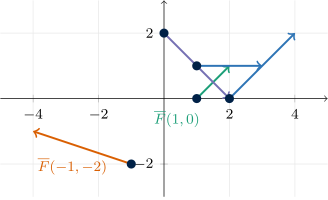
Each arrow is an output vector of based at one of the input points , , , , and . A dot marks each input point. Every output vector is drawn at true length. The green arrow is Example 7 and the orange arrow is Example 8.
Example 7
Evaluate the vector field
at the input point and draw the output vector.
ShowHide solution
By the definition of a vector field, takes the point as its input and returns a 2-D vector. Substitute and into both component functions of :
Draw the output vector from the input point to , one unit across and one unit up. It is the green arrow in the figure above.
Example 8
Evaluate the vector field
at the input point and draw the output vector.
ShowHide solution
Substitute and into both component functions, as in Example 7:
Draw the output vector from to , three units left and one unit up. It is the orange arrow in the figure above.
Example 9
A map gives positions in miles. The wind velocity in knots at the point is
Find the wind velocity at the point and draw it on the map.
ShowHide solution
Substitute and into both component functions of .
The wind at is knots, 1 knot toward negative and 2 knots toward positive . Draw it with its tail at the input point : one unit left and two units up reaches .
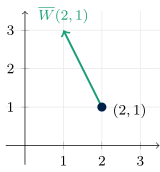
Interactive version. At Vector Field Visualization, the output vector moves from input point to input point, and the substitution is written out at each input point.
Next: 4. Plotting a Vector Field in RLesson map
4. Plotting a Vector Field in R
Objective. Use R to plot a given vector field.
- Define the field:
F = makeFun(c(x + y, x - y) ~ x & y). - Evaluate it at a point by calling it:
F(1, 0)returns[1] 1 1. - Plot it:
plotVectorField(F(x, y) ~ x & y). To make the picture easier to read, add one or more of the four options below. Type
mathaxis.on()andgrid.on()on their own lines after the plot.- The command
mathaxis.on()draws thick - and -axes through the origin. - The command
grid.on()adds dashed grid lines. - The arguments
xlim = c(-5, 5)andylim = c(-5, 5)insideplotVectorFieldset the window. Writingrange(-5, 5)in place ofc(-5, 5)sets the same window. - The argument
col = "red"insideplotVectorFieldsets the arrow color.
- The command
The c() command inside makeFun. The command c() makes the output a vector. With the command, makeFun(c(x + y, x - y) ~ x & y) defines a vector field. Without the command, makeFun(x + y ~ x & y) defines an ordinary function returning one number.
The inputs after the tilde. Both forms require the part ~ x & y, because that part lists both inputs.
Drawn versus true length. The drawn arrows are not at the true lengths of the output vectors. The command plotVectorField rescales every arrow by the same factor so that neighboring arrows do not overlap. Two arrows drawn the same length have equal true lengths. An arrow drawn shorter than another is shorter in true length. An exact output vector comes from substituting the input point by hand or from calling the field at that point in R.
Example 10
Define the vector field
in R and plot it.
ShowHide solution
Define with c() inside makeFun, then plot it with the axes and grid lines on:
G = makeFun(c(2*y, x - 1) ~ x & y)
plotVectorField(G(x, y) ~ x & y)
mathaxis.on()
grid.on()
G(1, 1)
As a check, substituting and by hand gives
and the arrow at in the plot points in the positive direction with no vertical part. The line G(1, 1) computes the same substitution in R and prints [1] 2 0.
Example 11
A map gives positions in miles. The wind velocity in knots at the point is
Plot the wind field in R over the window with and , with red arrows, and check the plotted arrow at against Example 9.
ShowHide solution
Define with c() inside makeFun, plot it with the window and color options, and evaluate it at . Used R.
W = makeFun(c(-y, x) ~ x & y)
plotVectorField(W(x, y) ~ x & y,
xlim = c(-3, 3), ylim = c(-3, 3), col = "red")
W(2, 1)
[1] -1  2
The output [1] -1 2 is the column , the wind velocity found by hand in Example 9. In the plot, the red arrow at points left and up, rising two units for each unit left.