Modeling with Exponential Functions I
Looking ahead
Objectives
- Use log and exponent rules to solve equations or simplify expressions.
- Interpret the parameters and of an exponential function, and describe how the function changes as each is adjusted.
- Given , calculate the doubling/halving rate of an exponential process (and vice-versa).
- Use log rules to show an exponential function becomes in semi-log form, where and .
- Given a function or dataset, use
plotPoints()to obtain a semi-log plot. - In R, use
makeFun()andplotFun()to define and plot logarithmic functions.
1. Log and Exponent Rules
Objective. Use log and exponent rules to solve equations or simplify expressions.
The natural logarithm is , the inverse of the natural exponential function , with domain .
Every logarithm in this course is the natural logarithm. The R spellings log(x) and exp(x) are on the Lesson 1 sheet, section 2.
Rule 1 (Log and exponent rules).
For , , and real numbers and , with a positive integer in , the rules below hold.
| Inverse pairs | Log algebra | Exponents |
Solving for a variable in the exponent.
- Isolate the exponential on one side.
- Apply to both sides. The other side must be positive, because is always positive; when it is zero or negative, the equation has no solution.
- Use to bring the exponent down.
- Solve for the variable with ordinary algebra.
Solving with a sum or difference of logarithms.
- Combine the sum or difference into a single logarithm with the log algebra rules.
- Apply to both sides.
- Use to clear the logarithm.
- Solve for the variable with ordinary algebra.
- Keep only the solutions at which every logarithm in the original equation is defined.
Example 1
Simplify by hand:
ShowHide solution
Rewrite each argument as a single power of , then bring each exponent down:
Example 2
Simplify by hand:
ShowHide solution
Move the coefficient 2 inside the logarithm as a power, then apply :
Example 3
Solve for by hand:
ShowHide solution
Isolate the exponential, then take of both sides:
In R, log(5/2)/3 prints [1] 0.3054302, which gives .
Example 4
Solve for by hand:
ShowHide solution
Combine the logarithms into one, then exponentiate both sides and solve for :
In R, 3/(exp(1) - 1) prints [1] 1.74593, which gives . Both logarithms in the original equation are defined there, because and are positive.
Example 5
Solve for in terms of by hand:
ShowHide solution
Split the logarithm of the quotient, then solve the linear equation for :
Next: 2. The Parameters and Lesson map
2. The Parameters and
Objective. Interpret the parameters and of an exponential function, and describe how the function changes as each is adjusted.
Definition 2 (General exponential function).
An exponential function is a function of the form
where , , and are constants with and , and . Its parameters are , the output at ; the steepness ; and the horizontal shift . With the form is .
The function is not an exponential function, because its exponent has no . Written as , it has , which the definition excludes. Its graph is the horizontal line .
Every exponential model on this sheet has the form , with .
Because , the output of is multiplied by the same factor over every input step of width .
A function is concave up on an interval if, for every two points on its graph over that interval, the straight segment joining them lies above the graph between those points.
A function is concave down on an interval if, for every two points on its graph over that interval, the straight segment joining them lies below the graph between those points.
A line is neither concave up nor concave down, because the segment joining two of its points lies along the line.
A horizontal asymptote is a horizontal line that the outputs of a function approach as increases without bound or as decreases without bound.
The graph of has the horizontal asymptote . When , the outputs approach 0 as decreases without bound and grow in size without bound as increases. When , the outputs approach 0 as increases without bound and grow in size without bound as decreases.
| Parameter | Role | Effect of the sign |
|---|---|---|
| the output at . When , the constant is the vertical intercept | : above the axis, concave up : below the axis, concave down | |
| the steepness of the curve: the larger is, the less has to change to double or halve the output | : grows as increases : shrinks as increases | |
| the horizontal shift | : shifts the curve right : shifts the curve left |
Every exponential function is monotonic (Lesson 3 sheet, section 4). The signs of and together decide whether the function increases or decreases, and the sign of decides whether the function is concave up or concave down.
Each graph below marks the output at , with in hours or months.
Positive and positive
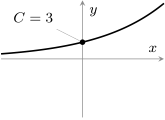
The function is increasing and concave up. A colony of bacteria that starts at 3 thousand and follows this model gains more bacteria in each later hour.
Positive and negative
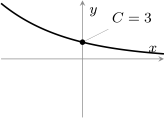
The function is decreasing and concave up. A 3-milligram dose of a drug that follows this model loses less of the drug in each later hour, approaching .
Negative and positive
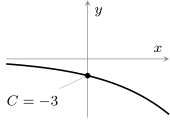
The function is decreasing and concave down. A debt recorded as a balance of thousand dollars that follows this model falls by more in each later month.
Negative and negative
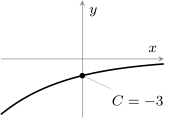
The function is increasing and concave down. A cold can is 3 degrees Celsius below room temperature. Its temperature minus the room’s follows this model and rises by less in each later hour, approaching .
Example 6
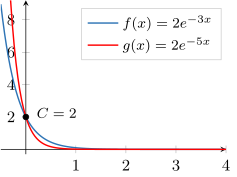
Plot the function below for , then state and and interpret each:
Then add the function to the same axes and describe what changed.
ShowHide solution
Define and plot , then define and add it in red:
f = makeFun(2*exp(-3*x) ~ x)
plotFun(f(x) ~ x, xlim = range(-0.5, 4))
mathaxis.on()
g = makeFun(2*exp(-5*x) ~ x)
plotFun(g(x) ~ x, add = TRUE, col = "red")
Match to the definition of an exponential function, with . The output at is , and . The blue curve crosses the vertical axis at that height. The steepness is the coefficient of in the exponent, . Because , the output shrinks toward the horizontal asymptote as increases. With and , the function is decreasing and concave up.
The red curve also has output 2 at . The curve decreases toward faster than , because the size of its steepness, , exceeds . The red curve lies below for every with .
Example 7
A model gives the amount of a drug in the bloodstream, in milligrams, hours after a 200-milligram dose:
A 400-milligram dose follows . State and for each model, and describe how doubling the dose changes the function.
ShowHide solution
Match each model to as in Example 6. The model has and , and the model has and . Factor 2 out of to compare the outputs:
Doubling doubles every output, and the green curve is the blue curve stretched vertically by a factor of 2. The black dots mark each curve’s starting value . The steepness is unchanged, and both models are decreasing and concave up.
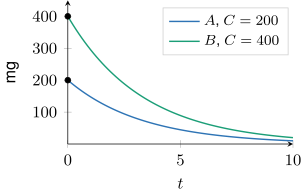
Over each hour, both outputs are multiplied by the same factor . In R, exp(-0.3) prints [1] 0.7408182. Each model keeps about 0.741 of its drug from one hour to the next.
The constant in plotFun(). A bare e in a plotFun() formula is a free parameter with no value, and plotFun() stops with an error:
> plotFun(2*e^(-3*x) ~ x, xlim = range(-0.5, 4))
Error in plotFun(2 * e^(-3 * x) ~ x, xlim = range(-0.5, 4)) :
  Cannot plot with free parameters; try setting e
Replace 2*e^(-3*x) with 2*exp(-3*x) to clear the error. The Lesson 3 sheet, section 3, shows the same mistake inside makeFun().
Next: 3. Doubling and Halving TimesLesson map
3. Doubling and Halving Times
Objective. Given , calculate the doubling/halving rate of an exponential process (and vice-versa).
Growth,
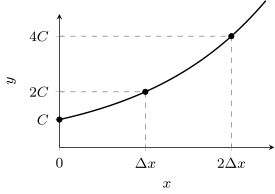
Over each input step of width , the doubling time, the output doubles. A population of cells reaches after one doubling time and after two.
Decay,
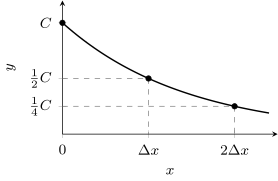
Over each input step of width , the halving time, the output halves. A dose of milligrams of a drug falls to after one halving time and after two.
For , set the output of at equal to twice the output at , and solve for the input step :
For , the same steps with in place of 2 give the step over which the output halves:
Neither step width depends on , the input where the step starts.
Definition 3 (Doubling time and halving time).
For with , the doubling time is the width of an input interval with and ; with and , the width is the halving time. In science contexts the halving time is called the half-life.
The two derivations above give the formulas
Solving each formula for gives from the doubling or halving time:
The function has no doubling time, because its steepness is negative and the definition requires . Its outputs only shrink, and it has a halving time instead. In the same way, the function has no halving time, because its steepness is positive and the definition requires for a halving time.
Proposition 4 (Independence from the starting output).
For , the doubling time of is the same from every starting output. For , the halving time is the same from every starting output.
For a single model with , growing from 40 to 80 takes the same input step as growing from 4000 to 8000. Quadrupling takes two doubling times, because .
Example 8
An algae population follows the model below, with in days:
Find the doubling time, then find how many days the population takes to grow from 80 to 320.
ShowHide solution
The model has a doubling time, because its steepness is positive, as the definition of doubling time requires. Divide by the steepness:
In R, log(2)/0.23 prints [1] 3.013683. The doubling time is about days. Growing from 80 to 320 multiplies the population by . Two doublings take two doubling times:
In R, 2*log(2)/0.23 prints [1] 6.027367. The population takes about days to grow from 80 to 320.
Example 9
Carbon-14 decays with a half-life of 5730 years. Find for the model below, with in years:
ShowHide solution
The steepness of a decaying model is divided by the halving time:
In R, -log(2)/5730 prints [1] -0.0001209681. The steepness is per year.
Example 10
A koala population starts at 150 and doubles every 75 days. Write the model , with in days.
ShowHide solution
The output at is . Substitute the doubling time 75 into , the doubling-time formula solved for :
In R, log(2)/75 prints [1] 0.009241962. The model is
with per day.
Example 11
The function
models the price of coal, in dollars per short ton, with counting years since 1989. The model was built on data from 1989 to 2011.
- (a) Report and the halving time, and explain each in context.
- (b) Predict the price of coal in 2021, and decide whether to trust the prediction.
ShowHide solution
(a) The output at is . According to the model, a short ton of coal cost $31.486 in 1989. With ,
In R, log(2)/0.048 prints [1] 14.44057. In the model, the price of a short ton of coal falls by half about every years.
(b) The input for 2021 is
Define the model and evaluate it at 32:
coal = makeFun(31.486*exp(-0.048*x) ~ x)
coal(32)
The last line prints [1] 6.777057: the model predicts $6.777 per short ton in 2021. The prediction is an extrapolation and deserves little trust, because 2021 lies outside the years 1989 to 2011 on which the model was built. The call coal(2021) uses the calendar year in place of years since 1989 and prints [1] 2.333879e-41, a price of zero to forty decimal places.
Next: 4. Semi-Log Form of an ExponentialLesson map
4. Semi-Log Form of an Exponential
Objective. Use log rules to show an exponential function becomes in semi-log form, where and .
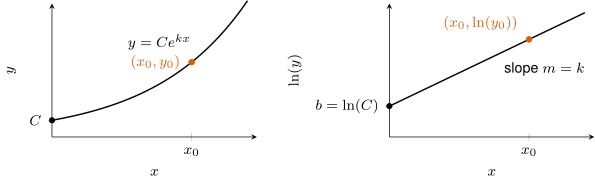
The left graph shows an exponential function with , and the right graph is its semi-log plot. Each point on the curve moves to , at the same input. The curve becomes a line with slope and vertical intercept , as the derivation below shows.
Definition 5 (Semi-log plot).
If is a point from a given data set or curve with , then its semi-log plot includes the point .
The data point does not appear on a semi-log plot, because is undefined. The definition requires .
Definition 6 (Semi-log form).
For an exponential function with , the semi-log form is the equation with and . It gives as a linear function of .
The function has no semi-log form, because makes every output negative, and is undefined for a negative .
For with , taking of both sides gives a linear function of :
Comparing with shows that is a linear function of , with slope and vertical intercept . Conversely, a semi-log line determines the parameters of the exponential function:
Example 12
Use log rules to write the semi-log form of the function below, and state its slope and vertical intercept:
ShowHide solution
The function has a semi-log form by the definition, because is positive. Take of both sides and split the logarithm of the product:
The semi-log form has slope
In R, log(31.486) prints [1] 3.449543. The vertical intercept is
Example 13
The semi-log plot of a data set lies on the line below. Find and , and write the exponential model:
ShowHide solution
The slope and the vertical intercept give
In R, exp(1.5) prints [1] 4.481689. The exponential model is
with and .
Next: 5. Semi-Log Plots in RLesson map
5. Semi-Log Plots in R
Objective. Given a function or dataset, use plotPoints() to obtain a semi-log plot.
For a semi-log plot in R, wrap the output in log() and leave the input as it is:
plotPoints(log(Output) ~ Input, data = DataSet)
The data = argument gives the stored data set (Lesson 2 sheet, section 6). Data typed in as vectors with c() need no data = argument.
For a function f with every output positive, the semi-log plot is plotFun(log(f(x)) ~ x).
Example 14
The data set Transistors records the number of transistors in an integrated circuit from 1971 to 2021 in the variables Year and Transistors. Make the standard plot and the semi-log plot of Transistors against Year in R.
ShowHide solution
Plot Transistors against Year, then plot its natural logarithm against Year for the semi-log plot:
plotPoints(Transistors ~ Year, data = Transistors)
plotPoints(log(Transistors) ~ Year, data = Transistors)
By the definition of a semi-log plot, each row becomes the point . The 1971 row records 2308.2417 transistors and plots at height . The 2021 row records 58.2 billion and plots at height . Both are the filled points below. R labels the vertical axis log(Transistors), its spelling of .
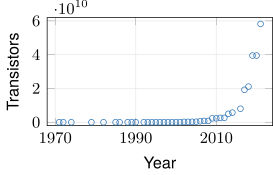
Standard plot: near zero until about 2010, then a sharp rise.
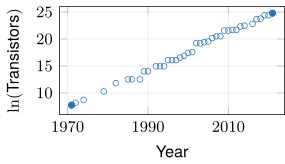
Semi-log plot: close to one rising line.
An exponential model is reasonable for the transistor counts, because the semi-log points lie close to one rising line, the pattern section 4 derives for an exponential function.
Example 15
The table gives air pressure, in inches of mercury, at altitudes in thousands of feet.
| Altitude | 0 | 5 | 10 | 15 | 20 | 25 | 30 |
| Pressure | 29.92 | 24.90 | 20.58 | 16.89 | 13.75 | 11.10 | 8.89 |
Make the semi-log plot in R. Then estimate from the slope between the first and last semi-log points, and find the halving time: the altitude gain over which the pressure halves.
ShowHide solution
The semi-log plot tests whether an exponential model is reasonable, the slope of the semi-log line estimates , and gives the halving time, here measured in thousands of feet. Store the data, make the semi-log plot, and compute the slope and the halving time:
Altitude = c(0, 5, 10, 15, 20, 25, 30)
Pressure = c(29.92, 24.90, 20.58, 16.89, 13.75, 11.10, 8.89)
plotPoints(log(Pressure) ~ Altitude)
m = (log(8.89) - log(29.92))/(30 - 0)
m
log(2)/abs(m)
The semi-log points lie close to a falling line. The first and last of them are and , the filled points in the figure. The R line for m substitutes them into the slope formula,
the slope of the dashed line. The last R line computes the halving time with in place of .
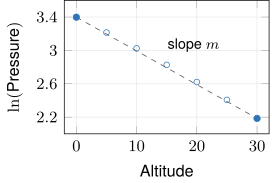
The last two lines print [1] -0.04045334 and [1] 17.13449. The two-point slope estimates the steepness, per thousand feet, and the pressure halves about every 17.134 thousand feet of climb.
Example 16
Plot the function below and its semi-log plot in R for . Then find and from the semi-log line:
ShowHide solution
Define and plot , then plot on the same interval:
f = makeFun(3*exp(2*x) ~ x)
plotFun(f(x) ~ x, xlim = range(0, 4))
plotFun(log(f(x)) ~ x, xlim = range(0, 4))
By the semi-log form, . The semi-log plot is the line with that equation, of slope 2 through . On R’s second plot the line starts at height and climbs 2 for each unit of . The conversion gives
Both values match .
Next: 6. Logarithmic Functions in RLesson map
6. Logarithmic Functions in R
Objective. In R, use makeFun() and plotFun() to define and plot logarithmic functions.
Definition 7 (General logarithmic function).
A general logarithmic function is a function of the form , where , , and are constants with , and its domain is .
The function is not a general logarithmic function, because its logarithm is squared. In the definition, the logarithm is multiplied by a constant and shifted by a constant .
The domain is because is defined only when , that is, when .
A vertical asymptote is a vertical line such that the outputs of a function grow in size without bound as approaches . The graph of has the vertical asymptote , approached from the right.
Each parameter of moves or stretches the graph of :
| Parameter | Effect on the graph of | In Example 18 |
|---|---|---|
| moves it right by when and left by when | : right 2 | |
| moves it up by when and down by when | : up 2 | |
| stretches it vertically by a factor of , and reflects it across the horizontal axis when | : stretched by 3 |
Every curve passes through the point , because .
The ylim window. Set ylim on every plot of a general logarithmic function. Without it, R scales the window to the outputs near the asymptote and squeezes the rest of the curve flat.
Example 17
State the domain, the vertical asymptote, and the output at for the function below, then plot it in R:
ShowHide solution
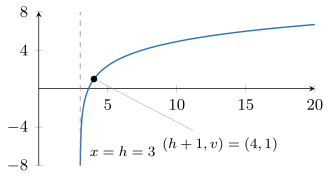
Matching the definition of a general logarithmic function, , gives , , and . The domain is , because the argument must be positive, and the vertical asymptote is the line . At the output is
the point that every such curve passes through. Plot it in a window that shows the asymptote:
f = makeFun(2*log(x - 3) + 1 ~ x)
plotFun(f(x) ~ x, xlim = range(0, 20), ylim = range(-8, 8))
Example 18
Plot on the window and , then add each function below to the same axes in its own color:
ShowHide solution
Plot on the window, then add each function with add = TRUE and its own color:
=1.2em f1 = makeFun(log(x) ~ x)
plotFun(f1(x) ~ x, xlim = range(0, 10),
ylim = range(-8, 8))
mathaxis.on()
f2 = makeFun(log(x - 2) ~ x)
plotFun(f2(x) ~ x, add = TRUE,
col = "blueviolet")
f3 = makeFun(3*log(x) ~ x)
plotFun(f3(x) ~ x, add = TRUE, col = "brown4")
f4 = makeFun(log(x) + 2 ~ x)
plotFun(f4(x) ~ x, add = TRUE,
col = "darkgoldenrod4")
f5 = makeFun(3*log(x - 2) + 2 ~ x)
plotFun(f5(x) ~ x, add = TRUE,
col = "darkseagreen3")
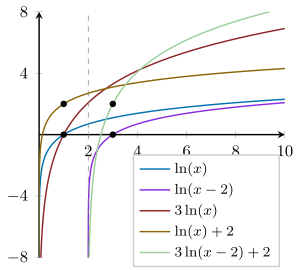
The black dots mark each curve’s point : for and , for , for , and for . The shift moves the point right 2, and moves it up 2.