Modeling with Power Functions
Looking ahead
Objectives
- Use
plotPoints()to obtain a log-log plot of data. - Use a log-log plot to decide whether a power model is appropriate.
- Given data exhibiting a power relationship, approximate the parameters by hand.
- Use log rules to show a power function becomes in log-log form, where and .
- In R, use
fitModel()to obtain the best-fit power model. - Evaluate a power model at a given input and interpret the answer.
Communication Homework and AI
HW 7* is graded on the written justification as well as on the answer.
Level 3 is the Math 141 default for every take-home assignment. Create your own work independently. After that you may take a draft to generative AI for feedback, such as suggestions for improvement, clarification, or editing tips, and then make your own revisions. Submitted work carries your own words.
Every use of generative AI is documented in the documentation statement. Using generative AI to edit your homework is like asking a friend for editorial feedback, and it is authorized. Using generative AI to solve the problem is like asking a friend to do your homework. Under the course letter it is outside the honor code.
For R, use the course-provided Math 141 R Assistant. Its answers use this course’s commands. General generative AI tools often suggest complicated commands the course does not use.
Course letter section 13 carries the full policy, including where generative AI is prohibited outright.
Datasets
The EngineRPM dataset (MMAC package) gives the mass and running speed of 39 engines. The variable Mass is in kilograms, from 0.135 to 102300. The variable RPM is in revolutions per minute, from 110 to 26000.
The Transistors dataset (MMAC package) gives the number of transistors in an integrated circuit, 39 observations from 1971 to 2021. The variables are Year and Transistors.
The flying-speed data (MMAC Ch 2.3, p 163) give the length in centimeters and the maximum observed flying speed in centimeters per second of five species of animals. The data are typed into R as vectors.
The HW 7* datasets ThreeBladeProp_T53 and TurboNormalizer_T53 come from the course’s USAFACalc package. To install the current USAFACalc, type updateUSAFACalc() in the Console.
1. Log-Log Plots
Objective. Use plotPoints() to obtain a log-log plot of data.
Definition 1 (Log-log plot).
If is a point from a given data set or on a curve, with and , then its log-log plot includes the point .
The data point does not appear on a log-log plot, because is undefined. The definition requires .
The semi-log plot is defined on the Lesson 5 sheet, section 4. In R, log() is the natural log . The log-log plot of a dataset D with input x and output y comes from
plotPoints(log(y) ~ log(x), data = D)
For data typed into R as vectors, put the vector names in the formula and leave off the data = argument of plotPoints() or fitModel(), as in Example 2.
Zero and negative values. The natural log takes positive numbers only. R returns -Inf for the log of 0 and NaN (“not a number”) for the log of a negative number:
> log(0)
[1] -Inf
> log(-2)
[1] NaN
Warning message:
In log(-2) : NaNs produced
Every input and every output must be positive to appear on a log-log plot, because the logarithm of zero or of a negative number is undefined. Modeling data with a zero or a negative value takes a method beyond this course.
Example 1
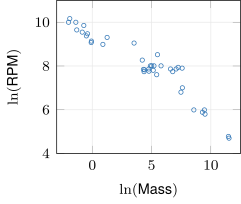
Obtain a log-log plot of the EngineRPM data.
ShowHide solution
By the definition of a log-log plot, each row becomes the point . Plot the logged RPM against the logged Mass:
=2.2em plotPoints(log(RPM) ~ log(Mass),
data = EngineRPM)
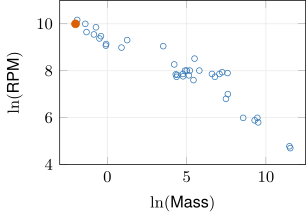
R writes as log(), and its axis labels log(RPM) and log(Mass) are and . The lightest engine, 0.135 kg at 22000 RPM, plots at , the orange point.
Example 2
Obtain a log-log plot of the flying-speed data.
| Length (cm) | 1.3 | 8.1 | 11 | 34 | 160 |
| Speed (cm/s) | 660 | 1120 | 1200 | 1560 | 2280 |
ShowHide solution
Type in the data, then plot the logged speeds against the logged lengths:
=2.2em Length = c(1.3, 8.1, 11, 34, 160)
Speed = c(660, 1120, 1200, 1560, 2280)
plotPoints(log(Speed) ~ log(Length))
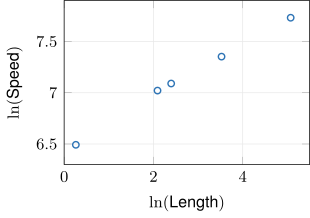
Each column of the table becomes the point . The 1.3 cm animal plots at , the leftmost point.
Next: 2. Reasonable Power ModelsLesson map
2. Reasonable Power Models
Objective. Use a log-log plot to decide whether a power model is appropriate.
Definition 2 (Power function).
A power function is of the form , where and are nonzero constants.
The function is not a power function, because its input is in the exponent. The definition puts the input in the base, raised to a constant exponent .
On this sheet the domain of a power function is , where is defined for every and exists.
Definition 3 (Power model).
A power function used to describe a dataset is a power model.
A linear model with fitted to a dataset is not a power model, because is then not of the form . The definition requires a power function.
In a power function the input is the base and the exponent is fixed. In the exponential model the input sits in the exponent. A power function has exactly two parameters, and . The horizontal shift belongs to the exponential model alone (Lesson 6 sheet, section 3).
For positive , the graphs of and both rise and bend upward. A curved standard plot therefore cannot separate the two families. The logged plots separate them. The semi-log plot of is the line , and the log-log plot of is the line . The semi-log plot of and the log-log plot of are curves.
Criterion 4 (Graphically identifying reasonable models).
- If the standard plot of a given data set is linear, then a linear model is reasonable.
- If the semi-log plot of a given data set is nonconstant linear, then an exponential model is reasonable.
- If the log-log plot of a given data set is nonconstant linear, then a power model is reasonable.
Build all three plots and compare them. Two of the three plots can be nonconstant linear at once.
Horizontal log-log line. A horizontal log-log line , with slope 0, gives the constant . A power function has a nonzero exponent , and the criterion therefore asks for a nonconstant log-log line.
Example 3
Determine whether a linear, exponential, or power model is reasonable for the EngineRPM data.
ShowHide solution
Apply the criterion for graphically identifying reasonable models. Build the three plots:
plotPoints(RPM ~ Mass, data = EngineRPM)
plotPoints(log(RPM) ~ Mass, data = EngineRPM)
plotPoints(log(RPM) ~ log(Mass), data = EngineRPM)
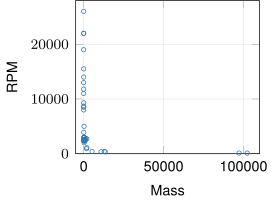
Standard plot
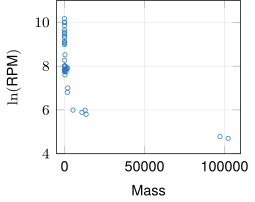
Semi-log plot
Log-log plot
The standard plot is not linear, because the RPM falls steeply and then flattens. Every engine under 3000 kg sits crowded against the vertical axis. The semi-log plot is not linear either, because it shows the same crowding and bend. The log-log plot is roughly linear and nonconstant, because its points scatter about one falling line. A power model is reasonable for the EngineRPM data.
Equally straight plots. When two of the plots look equally straight, both models are reasonable by the graphical test. The choice between them then rests on what is known about how the quantity grows: a quantity known to double over a fixed span of input calls for an exponential model.
Example 4
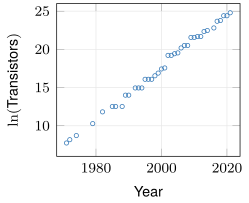
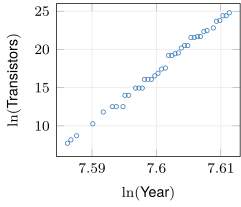
Determine whether an exponential or a power model is reasonable for the Transistors data.
ShowHide solution
Build the semi-log and log-log plots:
plotPoints(log(Transistors) ~ Year, data = Transistors)
plotPoints(log(Transistors) ~ log(Year), data = Transistors)
Semi-log plot
Log-log plot
Both plots are nonconstant linear, because each one’s points scatter about one rising line. The input runs only from to , a spread of about 0.025. Logging an input whose spread is so small next to its size barely changes the shape of the plot. Both an exponential and a power model are reasonable for the Transistors data by the graphical test.
Next: 3. Parameters by HandLesson map
3. Parameters by Hand
Objective. Given data exhibiting a power relationship, approximate the parameters by hand.
Fitting a power model by hand.
- Take the data points with the smallest and the largest input, and .
Find the slope from the logs of both coordinates:
Find the intercept by substituting the first point into :
- Convert with and (the log-log form theorem, section 4), giving .
For a dataset D with input x, the commands D[which.min(D$x), ] and D[which.max(D$x), ] print the two rows of step 1. To find them in the table instead, type View(D) in the Console and click the input’s column heading to sort by input.
Intercept by substitution. The Lesson 6 shortcut (Lesson 6 sheet, section 2) works for the shifted semi-log line, because that line takes the value at the first input, where . A log-log line takes the value where , that is, at , and the smallest input of a dataset is rarely 1.
Example 5
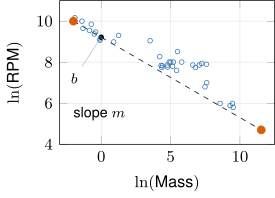
Approximate a power model for the EngineRPM data by hand, from the data points with the smallest and the largest mass.
ShowHide solution
Print the rows with the smallest and the largest mass:
EngineRPM[which.min(EngineRPM$Mass), ]
EngineRPM[which.max(EngineRPM$Mass), ]
The two rows are and . Substitute them into the formulas for the slope and the intercept of the log-log line:
R computes both values:
m = (log(110) - log(22000))/(log(102300) - log(0.135))
b = log(22000) - m*log(0.135)
m
b
exp(b)
The last three lines print [1] -0.3913621, [1] 9.215103, and [1] 10047.74. The slope is the slope of the dashed line through the two orange log-log points. The intercept is the height of that line where , that is, at a mass of 1 kg. Convert with and :
The by-hand model is
Example 6
Approximate a power model for the flying-speed data by hand, from the data points with the smallest and the largest length.
| Length (cm) | 1.3 | 8.1 | 11 | 34 | 160 |
| Speed (cm/s) | 660 | 1120 | 1200 | 1560 | 2280 |
ShowHide solution
As in Example 5, with the points of smallest and largest length, and :
R computes both values:
m = (log(2280) - log(660))/(log(160) - log(1.3))
b = log(660) - m*log(1.3)
m
b
exp(b)
The last three lines print [1] 0.2575815, [1] 6.42466, and [1] 616.8708. Then
and the by-hand model is
Next: 4. Power Functions in Log-Log FormLesson map
4. Power Functions in Log-Log Form
Objective. Use log rules to show a power function becomes in log-log form, where and .
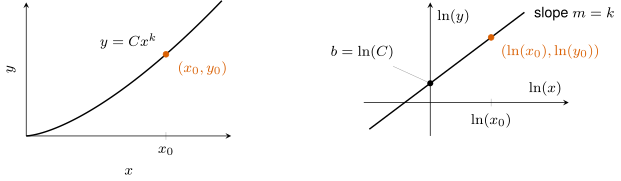
The left graph shows a power function with , and the right graph is its log-log plot. Each point on the curve moves to . The curve becomes a line with slope that crosses the vertical axis, where , at .
Definition 5 (Log-log form).
For , the log-log form of a power function with is the equation with and . It gives as a linear function of .
The power function has no log-log form, because makes every output with negative, and is undefined for a negative . The definition requires .
For and , taking the natural log of both sides of and applying two log rules (Lesson 5 sheet, section 1) gives a line:
Theorem 6 (Log-log form and conversion).
For , the power function with has the log-log form
where is the slope and is the vertical intercept. A log-log line with converts back to the power function with
Example 7
A dataset has the log-log fit
Write the equivalent power model.
ShowHide solution
By the log-log form theorem, the line converts back with and :
The power model is
Example 8
Write the power function
in log-log form.
ShowHide solution
The conversion from is and :
The log-log form is
Example 9
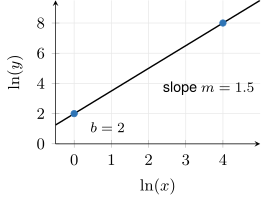
The log-log points of a dataset lie on the line through and , with on the horizontal axis and on the vertical axis. Write the power model.
ShowHide solution
The slope is
The line crosses the vertical axis, where , at . Then
and the power model is
Next: 5. Best-Fit Power Model in RLesson map
5. Best-Fit Power Model in R
Objective. In R, use fitModel() to obtain the best-fit power model.
The by-hand fit uses two points, and fitModel() uses every point. The formula given to fitModel() is the log-log line, and coef() prints that line’s and .
Fitting a power model in R.
Model = fitModel(log(y) ~ m*log(x) + b, data = D)
coef(Model)
Storing the model with = prints nothing. The command coef(Model) prints and of the log-log line. Convert and to and with the log-log form theorem.
Fitted model function. The stored Model is the fitted model function (Lesson 6 sheet, section 4). With a log-log formula, Model(x) returns the power model’s output .
Example 10
Find the best-fit power model for the EngineRPM data, and plot it on the data.
ShowHide solution
Fit the log-log line to every data point and print its slope and intercept:
RPMModel = fitModel(log(RPM) ~ m*log(Mass) + b, data = EngineRPM)
coef(RPMModel)
The last line prints
m b
-0.3396215 9.5138096
R labels each estimate with its name in the formula: m is the slope and b the intercept of the log-log line. Convert with and :
and the best-fit model is
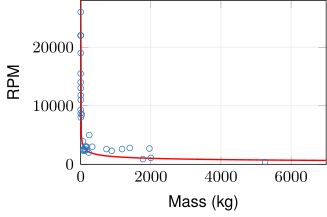
On the full range of mass, 0.135 to 102300 kg, the 33 engines under 3000 kg crowd against the vertical axis. Plot the model on the data with xlim limiting the horizontal axis to 0.1 through 7000 kg. That window contains 34 of the 39 engines and stays clear of 0, where the model is undefined:
=2.2em plotPoints(RPM ~ Mass, data = EngineRPM,
xlim = c(0.1, 7000))
plotFun(RPMModel(Mass) ~ Mass,
add = TRUE, col = "red")
Example 11
Find the best-fit power model for the flying-speed data.
| Length (cm) | 1.3 | 8.1 | 11 | 34 | 160 |
| Speed (cm/s) | 660 | 1120 | 1200 | 1560 | 2280 |
ShowHide solution
Type in the data and fit as in Example 10:
Length = c(1.3, 8.1, 11, 34, 160)
Speed = c(660, 1120, 1200, 1560, 2280)
SpeedModel = fitModel(log(Speed) ~ m*log(Length) + b)
coef(SpeedModel)
The last line prints
m b
0.2552451 6.4558632
Then
and the best-fit model is
Next: 6. Predictions and InterpretationLesson map
6. Predictions and Interpretation
Objective. Evaluate a power model at a given input and interpret the answer.
Evaluate the fitted model function by name, as in RPMModel(300). R then carries every digit of and .
The input goes in the data’s own units. When a question gives the input in meters and the data record centimeters, convert the input value to centimeters before the call.
The interpretation is one sentence, “The model predicts that …”, with the units of the input and the output written out. Interpolation and extrapolation are defined on the Lesson 4 sheet, section 3.
Example 12
Use the best-fit power model for the EngineRPM data to predict the RPM of an engine with mass 300 kg, and interpret the answer.
ShowHide solution
Evaluate the fitted model function at 300:
RPMModel = fitModel(log(RPM) ~ m*log(Mass) + b, data = EngineRPM)
RPMModel(300)
The last line prints [1] 1952.142. The model predicts that an engine with mass 300 kg turns at about 1952.142 revolutions per minute. The prediction is an interpolation, because 300 kg lies inside the data’s masses, 0.135 to 102300 kg.
Example 13
Use the best-fit power model for the flying-speed data to predict the flying speed of an animal 0.5 m long, and interpret the answer.
| Length (cm) | 1.3 | 8.1 | 11 | 34 | 160 |
| Speed (cm/s) | 660 | 1120 | 1200 | 1560 | 2280 |
ShowHide solution
Convert the length to the data’s units, 0.5 m = 50 cm, then fit as in Example 11 and evaluate the fitted model function at 50:
Length = c(1.3, 8.1, 11, 34, 160)
Speed = c(660, 1120, 1200, 1560, 2280)
SpeedModel = fitModel(log(Speed) ~ m*log(Length) + b)
SpeedModel(50)
The last line prints [1] 1727.427. The model predicts that an animal 50 cm long flies at about 1727.427 centimeters per second. The prediction is an interpolation, because 50 cm lies inside the data’s lengths, 1.3 to 160 cm.
The error is the observed output at a data point minus the model’s output at that point’s input.
A positive error means the model predicts too low at that point. A negative error means the model predicts too high.
Example 14
Find the error of the best-fit power model for the flying-speed data at the 34 cm animal, whose observed speed is 1560 cm/s.
| Length (cm) | 1.3 | 8.1 | 11 | 34 | 160 |
| Speed (cm/s) | 660 | 1120 | 1200 | 1560 | 2280 |
ShowHide solution
Fit as in Example 11, then subtract the model’s output at 34 from the observed speed:
Length = c(1.3, 8.1, 11, 34, 160)
Speed = c(660, 1120, 1200, 1560, 2280)
SpeedModel = fitModel(log(Speed) ~ m*log(Length) + b)
1560 - SpeedModel(34)
The last line prints [1] -5.482898. The error at the 34 cm animal is cm/s. The negative sign means the model predicts slightly too high there.
Example 15
The by-hand model of Example 5 and the best-fit model of Example 10 both describe the EngineRPM data. Determine which model falls to 2000 RPM at the smaller mass.
ShowHide solution
Solving for follows the inverse procedure of the Lesson 3 sheet, section 4. Dividing by gives , and raising both sides to the power gives
With , , and , each model’s mass at 2000 RPM is . The first two lines store the by-hand slope and intercept as mh and bh, and cf stores the best-fit coefficients:
mh = (log(110) - log(22000))/(log(102300) - log(0.135))
bh = log(22000) - mh*log(0.135)
(2000/exp(bh))^(1/mh)
RPMModel = fitModel(log(RPM) ~ m*log(Mass) + b, data = EngineRPM)
cf = coef(RPMModel)
(2000/exp(cf[2]))^(1/cf[1])
In cf, the entry cf[1] is and cf[2] is , in the order coef() prints them. The first calculation prints [1] 61.84118. The second prints 279.3505 under the label b, a name R carries over from cf[2]. The by-hand model falls to 2000 RPM at the smaller mass, because it reaches 2000 RPM at 61.841 kg and the best-fit model reaches 2000 RPM at 279.351 kg.
Both models and the level on one plot show the same order as the calculation:
=2.2em HandModel = makeFun(exp(bh)*Mass^mh ~ Mass,
bh = bh, mh = mh)
plotPoints(RPM ~ Mass, data = EngineRPM,
xlim = c(0, 400), ylim = c(0, 6000))
plotFun(RPMModel(Mass) ~ Mass,
add = TRUE, col = "red")
plotFun(HandModel(Mass) ~ Mass,
add = TRUE, col = "darkgreen")
plotFun(2000 ~ Mass, add = TRUE,
col = "grey40")
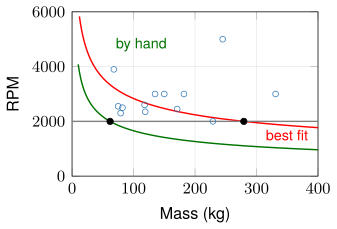
The green by-hand curve crosses the gray line at the black dot near 61.841 kg, and the red best-fit curve crosses it at the dot near 279.351 kg.