Multivariable Functions
Objectives
- Given a multivariable function, evaluate it at a given point, by hand or in R.
- Given a multivariable function in tabular or graphical form, evaluate it at given points and identify whether it is increasing or decreasing with respect to each input.
- Given a surface or contour plot, estimate where extreme values (min/max) occur.
- In R, use
makeFun()to define a multivariable function. - In R, use
plotFun()to generate a surface or contour plot for a two-input function on a specified domain.
1. Multivariable Functions
Objective. Given a multivariable function, evaluate it at a given point, by hand or in R.
Definition 1 (Multivariable function).
A multivariable function is a function with two or more inputs and only one output. A function of the two inputs and is written
A rule that gives both the temperature and the wind speed at the map location is not a multivariable function, because it has two outputs and the definition allows only one. The temperature at alone is a multivariable function.
A point gives the value to the input and the value to the input . The value of at the point is , found by substituting for every and for every . A point with more coordinates gives them to the inputs in the order the inputs are written: the point gives to , to , and to in .
Example 1
Evaluate the function at , , and , if possible:
ShowHide solution
By the definition of a multivariable function, has the two inputs and , and each point gives one output. Substitute and into the formula for :
Substitute and :
At , check the expression under the square root first:
The value is undefined, because no real number is the square root of .
Example 2
Evaluate the function at , , and , if possible:
ShowHide solution
Substituting each point into the formula gives
The value is undefined, because makes a division by zero.
Example 8 in section 4 evaluates and at these points in R.
2. Tables and Graphs
Objective. Given a multivariable function in tabular or graphical form, evaluate it at given points and identify whether it is increasing or decreasing with respect to each input.
Tabular form. A table of a two-input function lists the values of one input across the top row and the values of the other input down the left column. The corner cell names both inputs. In the corner cell of the table in Example 3, the input left of the backslash labels the rows, and the input right of the backslash labels the columns. The output at a point sits in the cell where the point’s row and column cross.
Definition 2 (Increasing and decreasing with respect to an input).
Increasing with respect to an input means that, on an interval of one input, the output always gets larger as that input increases while every other input is held constant at a given value.
Decreasing with respect to an input means that, on an interval of one input, the output always gets smaller as that input increases while every other input is held constant at a given value.
With every other input held constant, the output depends on one input alone, as for a function of one input.
A ball thrown straight up at meters per second has height
meters seconds after release. With , the function is neither increasing nor decreasing with respect to on , because the output neither always gets larger nor always gets smaller on that interval. The output rises from to and falls back to .
Example 3
The table gives , the wind chill (F) at air temperature (F) and wind speed (mph).
Find and . Then, over the inputs in the table, determine whether is increasing or decreasing with respect to when , and with respect to when .
ShowHide solution
Read the temperature from the top row and the wind speed from the left column. The column and the row give . The column and the row give .
By the definition of increasing with respect to an input, hold constant and read the outputs as increases. The function is increasing with respect to when , because the row runs as increases. Hold constant and read down its column. The function is decreasing with respect to when , because the column runs as increases.
Each graph plots the output against one input with the other input held constant. The first two graphs plot the wind chill (F) at air temperature (F) and wind speed (mph). Their points are the cells of the row and the column of the table in Example 3.
Increasing
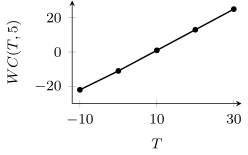
With the wind speed held at 5 mph, the wind chill rises from to F as the temperature rises from to F.
Decreasing
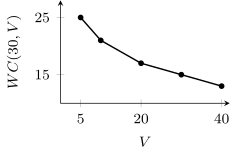
With the temperature held at F, the wind chill falls from 25 to F as the wind speed rises from 5 to 40 mph.
Neither
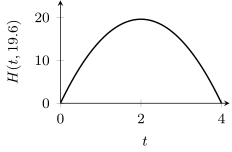
With the throwing speed held at 19.6 meters per second, the ball rises for 2 seconds and then falls for 2 seconds.
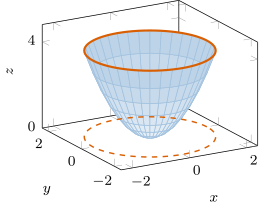
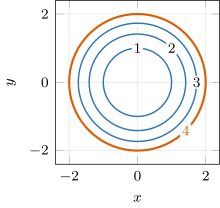
The figure shows two graphs of . The left graph is its surface plot: each output is a height above its point . The points of the surface at height 4 form the solid orange circle at the rim. Directly below that circle, the dashed circle in the -plane contains every point where , the level 4 contour. The right graph is the contour plot, with that contour in orange among the contours at levels 1, 2, and 3.
Definition 3 (Surface plot).
A surface plot is a three-dimensional graph where the value of each is plotted as a height measured relative to the -axis above or below the corresponding point on the -plane.
Definition 4 (Contour).
A contour of at level is a curve in the -plane containing all points where . A contour is also called a level curve.
For , the line is not a contour, because the outputs on it differ: and . Every point of a contour at level has the output .
Definition 5 (Contour plot).
A contour plot is a two-dimensional graph in the -plane of contours of at various levels.
The left graph in the figure of is not a contour plot, because it is three-dimensional, and the definition requires a two-dimensional graph in the -plane. The right graph is not a surface plot, because it shows each output as the level of a contour instead of as a height .
The plotted domain is the rectangle of inputs that a surface plot or contour plot covers, such as , .
Outputs on a contour plot. As in the textbook, every function plotted in these Notes is continuous on the plotted domain. Two contours are adjacent along a straight path when the path meets no other contour between them. On every contour plot in these Notes, the contours lie close enough together that, between two adjacent contours of different levels, the output only rises or only falls. Read an output from the plot by these rules:
- At a point on a contour, the output is that contour’s level.
- At a point between two adjacent contours of different levels, the output lies between their two levels.
- For a contour without a label on a plot with evenly spaced levels, find the level spacing, the difference between the levels of two adjacent labeled contours. Then count the contours out from a labeled contour, one level spacing per contour.
On a contour plot, increases straight to the right and increases straight up. The function is increasing with respect to when the contours along a path straight to the right rise in level, and decreasing with respect to when they fall in level. The function is increasing with respect to when the contours along a path straight up rise in level, and decreasing with respect to when they fall in level.
Example 4
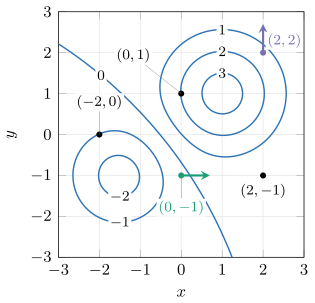
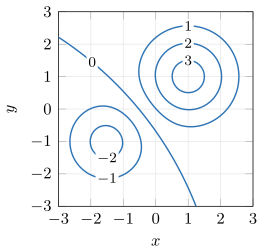
The figure is the contour plot of on , , with contours at levels to 3. Estimate , , and . Then determine whether is increasing or decreasing with respect to on when , and with respect to on when .
ShowHide solution
By the definitions of a contour plot and a contour, the figure shows contours of at levels to 3, and every point on the level 2 contour has output 2. The value is approximately 2, because is on the level 2 contour. Likewise, is approximately , because is on the level contour. The value is between 0 and 1, because is between the level 0 contour and the level 1 contour. The three points are the black dots in the figure.
The function is increasing with respect to on when , because the green path straight right from starts between the level and level 0 contours and crosses the level 0 contour toward higher levels. The function is decreasing with respect to on when , because the purple path straight up from starts between the level 2 and level 1 contours and crosses the level 1 contour toward lower levels.
3. Extreme Values
Objective. Given a surface or contour plot, estimate where extreme values (min/max) occur.
Definition 6 (Extreme values).
The extreme values are the maximum and minimum values of the function.
The global maximum of on a plotted domain is the numeric value for a point in the plotted domain such that for all in the plotted domain.
The global minimum of on a plotted domain is the numeric value for a point in the plotted domain such that for all in the plotted domain.
On the plotted domain , , the value of is not the global maximum, because is larger. The definition requires for every point in the plotted domain.
On a surface plot, the global maximum is the height of the highest point of the surface, and the global minimum is the height of the lowest point.
A peak is a point whose output is at least every output near it, and that output is a local maximum. A basin is a point whose output is at most every output near it, and that output is a local minimum. These are the two-input forms of the one-input definitions in section 3 of the Lesson 28 Notes. A global maximum at a peak inside the plotted domain is also a local maximum, and a global minimum at a basin inside the plotted domain is also a local minimum.
On a contour plot, an extreme value occurs in one of two places.
Extreme value inside the plotted domain
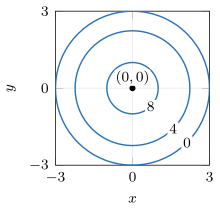
A global maximum inside the plotted domain occurs at a peak, inside an innermost contour of the highest level, with an output above that level. The height in meters of a hill has its global maximum inside the level 8 contour: the summit is 9 meters high. A global minimum inside the plotted domain occurs at a basin, inside an innermost contour of the lowest level, with an output below that level.
Extreme value on the edge of the plotted domain
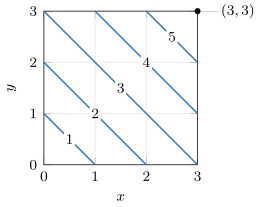
When the outputs keep rising toward an edge of the plotted domain and no peak inside reaches higher, the global maximum occurs on that edge. The height in meters of a ramp rises toward the corner , and its global maximum is : the top of the ramp is 6 meters high. When the outputs keep falling toward an edge and no basin inside reaches lower, the global minimum occurs on that edge.
Example 5
The figures are the surface plot and the contour plot of on , , with contours at levels to 3. Estimate the global maximum and the global minimum of on this plotted domain, and where each occurs.

ShowHide solution
By the definition of extreme values, the global maximum is the output that is at least every other output on the plotted domain. By the definition of a surface plot, each output is a height. The highest point of the surface is near , and the innermost contour of the highest level is the level 3 contour, centered near . The global maximum is therefore above 3, at approximately .
The lowest point of the surface is near , and the innermost contour of the lowest level is the level contour, centered near . As a result, the global minimum is below , at approximately .
Example 6
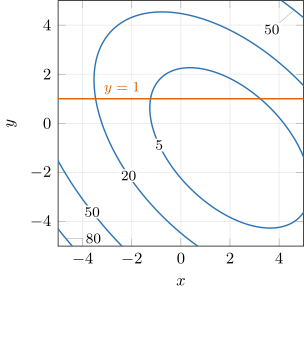
The figure is the contour plot of
on , , with contours at levels 5, 20, 50, and 80. Estimate the global minimum and the global maximum of on this plotted domain, and where each occurs. Then determine where is increasing and where it is decreasing with respect to when , as runs from to 5.
ShowHide solution
The innermost contour of the lowest level is the level 5 contour, centered near . The global minimum is below 5 at approximately . Substitute and into the formula for to estimate the global minimum:
The global minimum is approximately .
The level 80 contour appears only near the lower-left corner . The global maximum on the plotted domain occurs at that corner, because the outputs keep rising past the level 80 contour toward it. Substitute and to find the global maximum:
The global maximum is 90, at the corner .
The orange line runs from across the level 20 contour and then the level 5 contour, and later crosses the level 5 contour a second time. With held constant, the function is first decreasing and then increasing with respect to . Substitute into the formula to find where the change from decreasing to increasing happens:
The square is smallest at . When , the function is decreasing with respect to on and increasing with respect to on .
4. Defining a Multivariable Function in R
Objective. In R, use makeFun() to define a multivariable function.
To define a multivariable function, list every input after the tilde, joined by &. To evaluate the function, give a value for each input:
name = makeFun(formula ~ x & y & z)
name(x = 3, y = 4, z = 5)
Unnamed values in a call go to the inputs in the order written after the tilde. Named values, as in name(z = 5, y = 4, x = 3), go to the named inputs, whatever their order.
Example 7
Define the function in R and evaluate it at and :
ShowHide solution
Define with makeFun() and all three inputs after the tilde. Evaluate it at three ways (named inputs, named inputs in another order, and unnamed inputs) and then at the second point. Used R.
m = makeFun(x^2 + 7*y - z ~ x & y & z)
m(x = 3, y = 4, z = 5)
[1] 32
m(z = 5, y = 4, x = 3)
[1] 32
m(3, 4, 5)
[1] 32
m(x = 1.813, y = -4.267, z = 5.1)
[1] -31.68203
R gives all three ways and .
Example 8
Evaluate each function in R at the points given:
ShowHide solution
Define and with makeFun() as in Example 7, and evaluate each at its points. Used R.
f = makeFun(4*x^2 - 5*y*sqrt(x + 1) ~ x & y)
f(x = 3, y = 2)
[1] 16
f(x = 0, y = -2.1)
[1] 10.5
f(x = -2.1, y = 5)
[1] NaN
Warning message:
In sqrt(x + 1) : NaNs produced
k = makeFun(2*x - y/z ~ x & y & z)
k(x = 3, y = 8, z = 4)
[1] 4
k(x = 1, y = 9, z = -3)
[1] 5
k(x = 5, y = 2, z = 0)
[1] -Inf
k(x = 4, y = 0, z = 0)
[1] NaN
R gives , , , and , the values Examples 1 and 2 find by hand. R returns NaN or -Inf in place of a number at the three points where a function is undefined, as it does for one input (Lesson 2 Notes, section 5).
5. Plotting a Function of Two Inputs
Objective. In R, use plotFun() to generate a surface or contour plot for a two-input function on a specified domain.
To plot a function of two inputs, give the formula, both inputs after the tilde, and the plotted domain:
plotFun(f(x,y) ~ x & y, xlim = range(-5, 5), ylim = range(-5, 5))
The formula ends in ~ x & y, which names both inputs. Without that ending, R stops before drawing:
> plotFun(f(x,y), xlim = range(-5, 5), ylim = range(-5, 5))
Error: object 'x' not found
The options xlim and ylim set the plotted domain, here and , and the axes of the plot end at those values. To read the plotted domain from a finished plot, use the axis ends, which can lie past the last labeled tick mark.
By default, the command plotFun draws a shaded contour plot. Three options change the plot:
- with
surface = TRUE,plotFundraws a surface plot in place of the contour plot; - with
filled = FALSE,plotFundraws the contours without shading; - with
levels = c(5, 20, 50),plotFundraws the contours at those levels only.
Example 9
Define the function in R and evaluate it at , , and :
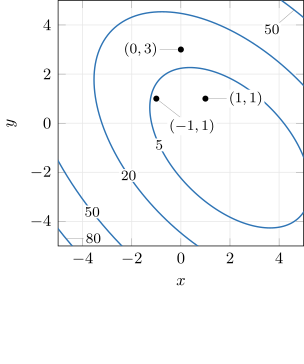
Then draw its surface plot and an unshaded contour plot at levels , 5, 20, 50, and 80, both on the plotted domain , . The figure is the unshaded contour plot.
ShowHide solution
Define with makeFun() and evaluate it at the three points. Used R.
p = makeFun(x^2 + x*y + y^2 - 3*x ~ x & y)
p(-1, 1)
[1] 4
p(1, 1)
[1] 0
p(0, 3)
[1] 9
R gives , , and . On the contour plot, the points and lie inside the level 5 contour, where the outputs are below 5. The point lies between the level 5 and level 20 contours, and its output 9 lies between 5 and 20. Draw the surface plot, and then the unshaded contour plot at the five levels, on the plotted domain. Used R.
plotFun(p(x,y) ~ x & y, surface = TRUE,
xlim = range(-5, 5), ylim = range(-5, 5))
plotFun(p(x,y) ~ x & y, filled = FALSE,
xlim = range(-5, 5), ylim = range(-5, 5),
levels = c(-3, 5, 20, 50, 80))
R draws no level contour, for the reason stated after this example.
Missing levels. The command plotFun draws a contour only at a level that the function reaches at more than one point of the plotted domain. In Example 9, plotFun draws no level contour, because reaches only at the point . Completing the square gives
Both squares are 0 only when and , and every other point gives . On the plotted domain , , plotFun draws no level 20, 50, or 80 contour, because the largest output there is . That output sits at the lower-left corner, toward which the outputs rise in the figure of Example 9.
Example 10
The National Weather Service models the wind chill (F) at air temperature (F) and wind speed (mph), for and , by
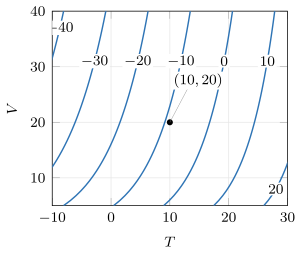
Define in R and evaluate . Then draw an unshaded contour plot of on the plotted domain , , with contours at levels , , , , 0, 10, and 20.
ShowHide solution
Define with makeFun(), listing and after the tilde, and evaluate it at . Used R.
WC = makeFun(35.74 + 0.6215*T - 35.75*V^0.16 +
0.4275*T*V^0.16 ~ T & V)
WC(T = 10, V = 20)
[1] -8.876221
R gives . Rounded to a whole degree, the value is the in the column and the row of the table in Example 3. Draw the contour plot on the plotted domain at the seven levels. With first after the tilde, R puts on the horizontal axis. The option xlim then sets the range of , and ylim sets the range of . Used R.
plotFun(WC(T,V) ~ T & V, filled = FALSE,
xlim = range(-10, 30), ylim = range(5, 40),
levels = c(-40, -30, -20, -10, 0, 10, 20))
R labels each contour with its level, as in the figure. The point lies between the level and level 0 contours, and its output lies between and 0. The function is increasing with respect to , because the contours along each path straight right rise in level.
Found a mistake, a broken tool or something unclear? Report a problem